CONCEPTS
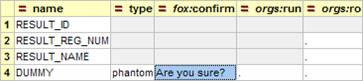
fox:confirm
Used on phantom elements and actions. The contents of this attribute will be displayed in a box and the user presented with an option to confirm the action or cancel it.
fox:key-true, fox:key-false
If data item is displayed as a tick box or selector, these are displayed to the user instead of “true” and “false”.
NB: We often override this to fox:key-true=”” so for a tick-box the word “true” will not appear next to it.
fox:mand
With this attribute you make an element in your schema mandatory and this will be picked up by validation.
fox:mand="true()" ~ fox:key-missing="Select One" (can override).
If an element in the schema is set to mandatory and a value is missing, the default message is “Select One”. Use this element to override it.
fox:mand="false()" ~ fox:key-null="None" (can override).
If an element is not mandatory it will, when displayed as some widgets, have an option “None”. You can specify the name of that option with this attribute.
Contexts
- :{attach} – current attach point.
- :{action} – where an action was raised in the DOM.
- :{user} – information about user, provided they are logged on to the UK Oil Portal.
- :{sys} – internal system information (more later).
- :{session} – temporary DOM area persists for the life-time of the Browser Session.
- :{theme} – temporary DOM area persists for current Module Call.
- :{temp} – transient temporary DOM area persists for current Action only.
- :{error} – error DOM.
- :{assignee} – special used with fm:assign.