To call another module from your FOX module you use fm:call-module. You can pass parameters to the new module and you can receive data back from it when it returns (performs a module pop).
SYNTAX
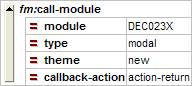
An fm:call-module call is quite straight forward. It is done in an action:
CONCEPTS
Params
The params attribute can be specified and is an XPath that points to values that will be passed to the new module.
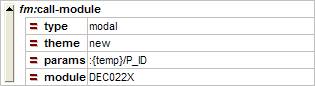
These parameters are made available to the new module in the :{params} DOM in elements of the same names as in the calling module’s DOM.
NB. You can pass more than one parameter using a pipe '|' in the XPath or set up a complex element in the Temp DOM and pass the contents of that element (i.e element/*).
Call type
You can specify two different types of module calls: modal and modeless. Modal is when the new module replaces the old one in the same window, modeless will open a new window and navigation can continue in both windows.
Callback-action
You can specify an action in your module that will run when the called module returns.
Returning things
If your module is called by another, during the course of the execution of your code you can copy data to the :{return} DOM. The data in this DOM will be returned to the calling module when you do an fm:exit-module.
Data returned from a module is available to the calling module the :{result} DOM.
Theme DOM
The name of the Theme DOM stems from the fact that it is valid for entering into a module on an entry theme. This means that the theme DOM is valid for each module from entering on an entry theme to exiting the module.
When a new module is called, an empty Theme DOM is created for that entry theme. When an exit-module is called and focus returns to a previous module, the Theme DOM for that module is restored.
EXAMPLES
Example 1
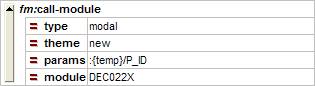
Calling a module called DEC022X that will open in the same window using the “new” entry theme:
Example 2
Callling a module called DEC023X from DEC022X that will open in the same window using the “new” entry theme. When DEC023X does a fm:exit-module, DEC022X will perform the action, “action-return”.
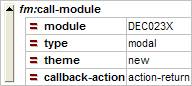
A sample action-return action on the calling module can look like this:
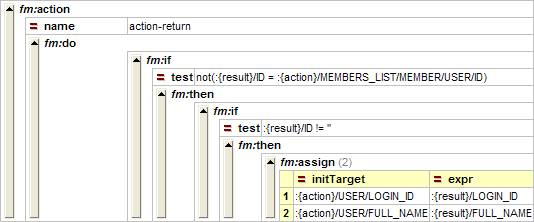
When the called module returns, a series of conditions are tested. If they are all valid, two assigns are made. As you can see, values are taken out of the :{result} DOM, which is available only to the callback-action.
EXERCISES
Please use your XX_ORDERMODULE (where XX are your initials) file for the following exercises.
Exercise 1
Create an action named “action-employee” that uses call type “modal” to call XX_EMPLOYEEMODULE using the “new” entry theme.