This worksheet tells you how to create a map-set without using a database query in the storage location.
SYNTAX
The main lesson of this worksheet is what you do in the map-set fm:do-block. In this example a query is in fact run in the map-set fm:do-block:
<fm:map-set name="ms-mapset-example">
<fm:storage-location>sl-mapset-example</fm:storage-location>
<fm:do>
<fm:run-query interface="dbint-mapsets" query="qry-mapset"/>
</fm:do>
<fm:refresh-timeout-mins>0</fm:refresh-timeout-mins>
<fm:refresh-in-background>true</fm:refresh-in-background>
</fm:map-set>
CONCEPTS
A map-set definition always requires a storage location to be defined and referenced first. The storage location will ensure that the XML root element is initialised and no more.
The fm:do block meta-code defines how the remainder of the XML is constructed.
Important: When using do block runs:
- Context :{attach} (attach point) is temporarily moved to the storage location XML root
- The Data DOM is still accessible using :{root}, although the previous attach is not
- Thus any "." based meta-code XPath is operating on the map-set DOM
Any FOX meta-code can be used to construct the map-set DOM:
- A Database Interface Query can be used
- Templates using conditional logic (example 1 below)
- Combinations of the above
- Other, such as fm:for-each, fm:copy, fm:assign (covered later)
The refresh-timeout-mins specifies how long the constructed data is good for:
- If underlying data changes frequently, consider 5, 3 or even 0 mins. Otherwise 30 mins+
- Special value of 999999999 mins, actually means never refresh - not even the first time
Refresh may be earlier than that specified, if XML was flush from memory to free space.
Important: fm:do is responsible for removing old XML as well as constructing new XML. Consider using fm:run-query mode="PURGE-ALL", or fm:remove at start of fm:do block.
EXAMPLES
Using template
It is possible to use a template to initialise the data in a map set. The following is an edited extract from the module REV002L:
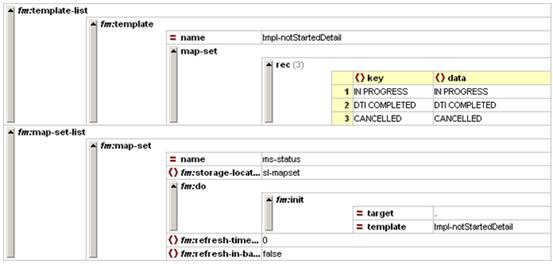
As you can see the map-set ms-status is initialised from the template called tmpl-notStartedDetail when the template is used.
EXERCISES
Please use your XX_EMPLOYEEMODULE (where XX are your initials) file for the following exercises.
Exercise 1
Add a map-set called “ms-weekdays” that is initialised from a template called “tmpl-weekdays”. It should use the following details:
Key |
Data |
Monday |
MON |
Tuesday |
TUE |
Wednesday |
WED |
Thursday |
THU |
Friday |
FRI |
Saturday |
SAT |
Sunday |
SUN |
Exercise 2
Add a new element to /theme/EMPLOYEE_LIST/EMPLOYEE with the name “WEEKDAY” Associate it with the map-set “ms-weekdays”. Use an action to call “action-dummy” when a selection from the map-set is made.
Exercise 3
Create another map-set called “ms-work” that is initialised from either one of two templates. The first one is called “tmpl-week” and contains the following:
Key |
Data |
Half day (3.5 hrs, half pay) |
HD |
Full day (7 hrs, full pay) |
FD |
The second is called “tmpl-weekend” and contains the following:
Key |
Data |
Not working today |
NO |
Half day (3.5 hrs, full pay) |
HD |
Full day (7 hrs, double pay) |
FD |
When ms-weekday initialises, a decision should be made depending on which day is set in theme/EMPLOYEE_LIST/EMPLOYEE/WEEKDAY. If it is a weekday, the “ms-work” map-set should be initialised using “tmpl-week”, but otherwise “tmpl-weekend” should be used.
Create a new element called “WORKHOURS” in /theme/EMPLOYEE_LIST/EMPLOYEE that allows the user to select an option from “ms-work”.