Learn about the DOM (Document Object Model) and how FOX uses the DOM to manipulate XML internally. Also, learn about contexts in FOX and how they reference different points in the DOM.
SYNTAX
The DOM specified by the W3C describes different ways that a program can update the content, style and structure of a document, in FOX’s case an XML document.
FOX has several different DOM’s. You will primarily use the “data” DOM (also known as the “root” DOM) which is where the majority of the information for the current screen is stored, but there are other DOM’s with different lifespans, ranging from the “temp” DOM which lasts for one Transaction Process (See chapter 7), to the “session” DOM which lasts until the browser is closed.
You can reference different DOM’s in FOX using a context notation in your XPath expression. This is extremely useful in that you can reference different DOM’s concisely in one statement. The syntax of the context notation is:
:{context}
There are reserved context names for the different DOM’s. Contexts are pointers, so they need to be evaluated. For example, the theme DOM is referenced using the :{theme} syntax in an XPath expression. The :{theme} context is evaluated to an absolute XPath internally in FOX, so you don’t need to worry about a long, complicated XPath expression. If the theme DOM looked like the following:
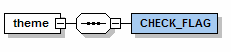
You could find out the value of CHECK_FLAG by referencing it with the XPath:
:{theme}/CHECK_FLAG
Here is a list of the DOM’s, their scope (lifespan), their FOX XPath contexts (always lower case) and a description:
DOM Name |
Scope |
Context |
Description |
Data |
1 Module Call |
:{root} |
This is the main area of data storage and can be easily written back to the database in a Storage Location. |
Theme |
1 Module Call |
:{theme} |
Used to store data that you don’t want stored with the module data and is usually used for presentation fields and storing temporary values or flags. You can mark up the Theme DOM. |
Temp |
1 Transaction |
:{temp} |
Used to set values or collate data from multiple sources to be used in one place for a transaction, but its life span is very short and cannot be used for setting out data |
Session |
1 Browser Session |
:{session} |
Used for one Browser session, that is for the life of one Browser window. It is useful for storing copied data to be pasted into different modules. |
User |
1 Portal Session |
:{user} |
Stores information about the current user logged in to the UK Oil Portal. You should not write information to it. |
Sys |
1 Module Call |
:{sys} |
Similar to the Session DOM, but is constantly updated by FOX. You should not write information to it. |
Params |
1 Module Call |
:{params} |
Contains any parameters passed to the module from when it was called. You should not write data to it. |
Error |
1 Module Call |
:{error} |
Contains a list of validation errors, generated when the fm:validate command is run. You should not write data to it. |
THE “EVALUATE CONTEXT” RULE
The “Evaluate Context” rule dictates where a relative XPath expression evaluates from, using the notation “.” (period) to reference the evaluation point. The rule is that . evaluates to the last complex element, except when the item itself is complex, in which case . is the current element.
For example, in this diagram:

If you were trying to mark-up the QUANTITY element, . would evaluate to ORDER_DETAILS which is the last complex element. However, if you were marking up ORDER_DETAILS then . would evaluate to ORDER_DETAILS.
PREDEFINED CONTEXTS
FOX also has predefined contexts for different parts of a DOM.
- :{action} references the context of the current action. You will learn about contextual actions when you read about phantoms in a later chapter.
- :{attach} references the current attach point in the Data or Theme DOM. You can also use the . notation.
- :{baseself} is same as . outside predicates, but is an alternative to :{attach} inside predicates.
E.g. for fox:validate="./A/B[. = 1 or . = :{attach}/G or . = :{baseself}/C]" here:
- "." outside predicate follows the “Evaluate Context” for the XMLSchema element.
- "." inside predicate is all ./A/B elements.
You can also create your own context’s in the <fm:context-localise> command and as a pointer in a <fm:for-each> loop.
As well as marking up the Data DOM with namespace:attribute attributes, you can also mark-up the Theme DOM.
EXERCISES
Please use your XX_EMPLOYEEMODULE (where XX are your initials) file for the following exercises.
Exercise 1
Create a new Global Element in XMLSpy’s Schema View called “theme”. It should be created at the same level as ROOT (i.e. it should be a top level element). FOX will match this schema against the Theme DOM.
Exercise 2
Move the EMPLOYEE_LIST element into the Theme DOM.
Exercise 3
Alter the set out so that the COMPANY_INFO is set-out from the ROOT DOM and the EMPLOYEE_LIST is set out in the theme DOM.
Hint: You will need to initialise the template for both DOMs within the entry-theme.
Exercise 4
Change the message for the alert that appears when the module loads from “Welcome to the EMPLOYEEMODULE!” to show the name of the current state.