The FOX init command is used to initialise data in any of the DOMs available. fm:init is called in an action and it can be triggered by an entry theme or, for example, by pressing a button (as you will see later).
SYNTAX
Our FOX Module uses data from a template, therefore when initialising the data the fm:init command will look like the following:

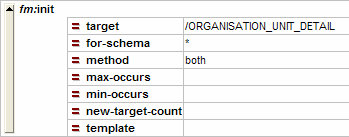
A more common use and some of the other parameters of the init command may look like the following:
Parameter |
Purpose |
target |
An XPath pointing to the element or list element that you want to initialise. Normally pinpoints one or more collection elements (records). |
for-schema |
This is an XPath referring to the XML schema in the module relative to the target and specifies which elements that are specified in the schema should be initialised. |
method |
This can be either “augment”, “new” or “both”, meaning adding elements to records that already exist, add only elements to new records or both. |
max-occurs |
If initialising a repeating element, this is the maximum number of occurrences you want. It adjusts the new-target-count parameter. |
min-occurs |
If initialising a repeating element, this is the minimum number of occurrences you want. |
new-target-count |
When initialising a repeating element, if you want more than one, set this parameter to the number of elements you want. Adjusted by the max- and min-occurs parameters. |
template |
It is possible to create templates in template-list in FOX modules. If you want to initialise your element using a template, specify the name here. See example 3. |
CONCEPTS
Default
You can set a default value on an element in the schema by using default=”value” (no namespace).
Fixed
If the fixed=”” attribute is defined this implies that the element does not change value (no namespace).
Using database queries
There are a number of things you can do on the XML Schema in your FOX module to specify what happens when you initialise an element.
In the schema you can specify fox:init-db-interface and fox:init-query. These are the names of the interface and the query respectively that will be used to initialise the element with a value. See example 1 below.
Using an XPath
It is possible to use an XPath to initialise the value of an element using any of the DOMs available in FOX. This is done by declaring the fox:init-xpath attribute on an element in the schema. See example 2 below.
XPaths are relative
The XPaths used in these attributes are all relative to the target record.
Consider the following for the for-schema attribute (please revise XPaths if these don’t make sense):
fox:for-schema=”.” |
The record only, no child elements |
fox:for-schema=”*” |
All child elements |
fox:for-schema=”*/*” |
All children of all child elements |
fox:for-schema=”//*” |
The element and all descendants |
fox:for-schema=”* | INFO/*” |
All child elements and all child elements of the INFO element are initialised |
Not using several inits
A word about initialising efficiently. If you want to initialise several elements that are not siblings and exist in the schema, you can use the pipe, “|”. For example, instead of doing <fox:init target=”/*/CAT”/> and then <fox:init target=”/*/DOG”/> you can do <fox:init target=”/*” for-schema=”CAT | DOG”/>.
Do not initialise too much
A common mistake that people make is to initialise too much. Consider the following XPath /*/SECTION_A//* that will initialise the whole of section A (with all descendants) when perhaps only a small part of it was needed.
EXAMPLES
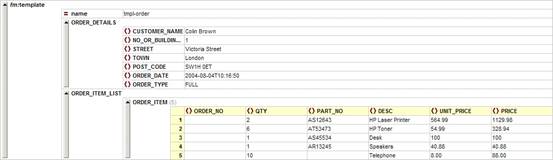
Using a template
In XX_ORDERMODULE, the following fm:init is run on entry to the module:

The template looks like this:
Using fox:init-xpath to initialise the value of an element
The following example will count the number of similar nodes and add 1 to that value and use this as value of the POSITION element when the EMPLOYEE element is initialised:
<xs:element name="EMPLOYEE" minOccurs="0" maxOccurs="50" newEmployee:ro=".">
<xs:complexType>
<xs:sequence>
<xs:element name="POSITION" type="xs:integer" fox:init-xpath="count(parent::node()/preceding-sibling::EMPLOYEE)+1"/>
<xs:element name="ID" type="xs:integer">
</xs:sequence>
</xs:complexType>
</xs:element>
Using fox:init-db-interface on the schema
The following is specified on the schema:
<xs:element name="ID" type="xs:integer" default="-1" fox:init-db-interface="fox-sequence" fox:init-query="fox-sequence"/>
The module db-interface-list contains the following:
<fm:db-interface-list>
<fm:db-interface name="fox-sequence">
<fm:query name="fox-sequence">
<fm:select>
select foxseq.nextval "."
from dual
</fm:select>
</fm:query>
</fm:db-interface>
</fm:db-interface-list>
NB: Copied from reference manual, not tested
This example will cause the element named ID to be initialised with a value from a sequence in the database when the init command is invoked.
EXERCISES
Exercise 1
In XX_ORDERMODULE (where XX are your initials), create and set-out an action named “action-new-order” that will add a blank order item to the list. Give the action the prompt “Add New Order”.
Exercise 2
Use fox:init-xpath in the schema to pre-populate the order number element. It should be set to the value of an incremented counter of the number of orders in the list. The following fm:init command needs to be added to the entry-theme:
<fm:init target="/*/ORDER_ITEM_LIST/ORDER_ITEM" for-schema="ORDER_NO"/>